Free Timesheet Template
Download a clean, editable timesheet template — Excel, Word or CSV. The Excel file totals your hours and pay for you. Free, no sign-up, no watermark.
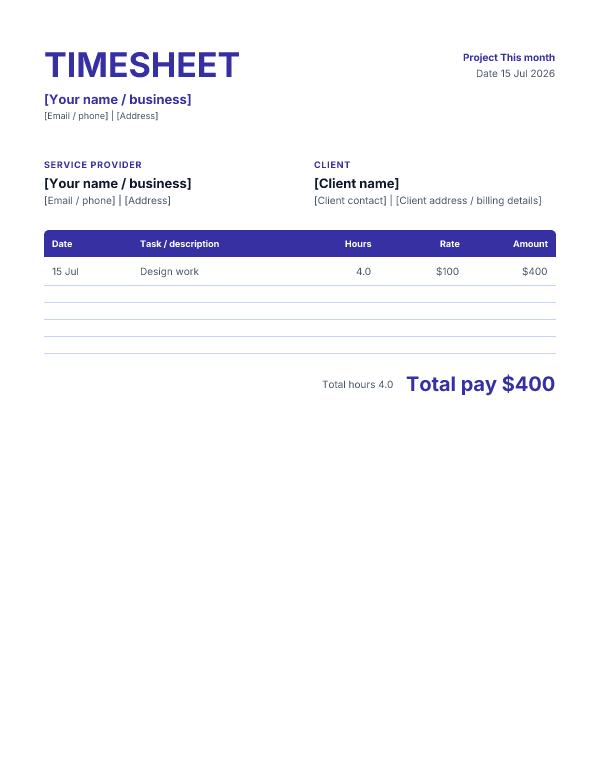
Classic layout · Indigo color
Excel files keep a spreadsheet/grid structure, so their layout variations are necessarily limited. Word files reflect the selected layout more fully. CSV has no styling and stays the same for every choice.
Prefer not to download? Fill one in online → — live preview, export a PDF, nothing to install.
What's in the template
Each template has the fields a timesheet needs: your details, the client or project, the period, and a table of entries (date, task / description, hours, rate, amount), with totals for hours and pay. The Excel version includes formulas so each line's amount and the totals update as you fill it in.
How to use it
- Choose a layout and color, then download your preferred format (Excel for automatic totals).
- Replace the bracketed placeholders with your details.
- Log each entry — date, task, hours and rate; the Excel totals update automatically.
- Save as PDF (File → Save As / Export) and attach it to your invoice.
Related
Want it filled in for you instead? Use the timesheet generator. Ready to bill the hours? Create an invoice, or work out your rate with the freelance rate calculator.
FAQ
Are these timesheet templates free?
Yes — free to download and use, no sign-up, no watermark. The Excel and Word files are fully editable; reuse them every week or month.
Does the Excel template total my hours and pay?
Yes. The .xlsx has built-in formulas: each line's Amount = Hours × Rate, and the total hours and total pay update as you type.
Which format should I use?
Excel (.xlsx) for automatic totals, Word (.docx) for a document you type into, or CSV for a plain universal file. Or fill one in online with our timesheet generator.
Can I attach the timesheet to an invoice?
Yes — that's the point. Fill it in, save as PDF, and attach it so the client can see exactly what they're paying for.